The Heart of the Three Village Community
Posts Tagged ‘technology’
Tech Help – Make an Appointment
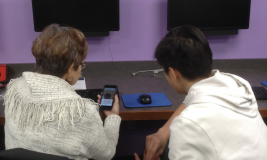
Have questions about your cell phone, computer, or tablet? We have help on both weekday evenings AND weekends!
Local teen & tween volunteers will be in our Technology Center to answer your simple technology questions and help you learn how to use your mobile devices, including cell phones, tablets, and e-readers on the following dates:
Register for this date now:
Saturday, June 13, 10:00 a.m. – 12 noon
Register for these dates starting 6/16:
Thursday, July 16, 6:00 – 8:00 p.m.
Saturday, July 25, 10:00 a.m. – 12 noon
Thursday, August 20, 6:00 – 8:00 p.m.
Saturday, August 22, 10:00 a.m. – 12 noon
Appointments are required. Click here for our Adult program calendar. Or call 631.941.4080 to register.
Questions? Email askus@emmaclark.org
Learn Something New or Get Great Tips
W offer a lineup of engaging computer and technology classes!
Picture Perfect: Organize and Edit Your Photos (Online)
Monday, June 8, 6:30 – 8:00 p.m.
We’ll show you simple ways to organize, back up & edit your pictures with easy-to-use tools. Presented by Lindsay Citrano. Click here to register now.
Streaming 101: Cutting the Cord (In-Person)
Thursday, June 11, 6:30 – 8:00 p.m.
Learn about Amazon’s Fire Stick, Roku & Chromecast with Google TV, and find the best option for you. Taught by IT Manager Bob Johnson & Tech Librarian Jen Mullen. Click here to register now.
Introduction to Microsoft Word (3-Part, In-Person Class)
Monday, Tuesday, & Wednesday, June 15, 16, & 17, 10:00 a.m. – 12 noon
This popular software application allows you to write letters and resumés, create invitations, flyers and much more! Proficiency using a mouse required. Must be able to attend all 3 sessions. Taught by Tech Librarian Jen Mullen. Click here to register now.
Digital Scrapbooking: Make Memories That Last (Online)
Wednesday, June 24, 6:30 – 8:00 p.m.
Bring your family stories & favorite photos to life in a digital scrapbook. Presented by Lindsay Citrano. Click here to register now.
Digital Dust: Protecting Your Privacy Online (Online)
Monday, July 6, 6:30 – 8:00 p.m.
These days, it seems like almost everything is being done ONLINE. We often ask ourselves how much of our private information is on the Internet and what can we do to help protect that information from falling into the wrong hands? During this discussion, we will go over some of the best practices for securing your online presence. From social media and email to online banking and the Dark Web, we will provide an overview of changes you can make to provide a safer and more secure online experience. We’ll even go over trusted websites that will help you determine if your accounts have been compromised. Taught by IT Manager Bob Johnson & Tech Librarian Jen Mullen. Register for Digital Dust here starting 6/16.
Introduction to Microsoft Excel (2-Part, In-Person Class)
Monday, Tuesday, & Wednesday, August 3, 4, & 5, 6:30 – 8:30 p.m.
This two-part class introduces Microsoft Excel. Excel is an electronic spreadsheet program used for storing, organizing and manipulating data such as address lists and budgets. Taught by Tech Librarian Jen Mullen. Basic knowledge of computers and using a mouse required. Must be able to attend all 3 sessions. Register for the Excel class here starting 7/13.
PC Clean Up (In-Person)
Monday, August 10, 10:00 a.m. – 12 noon
Bring your PC laptop and learn how to clean and speed it up. If you don’t have one, don’t worry, you can use ours to learn. This class is specifically tailored for PCs and not applicable to Mac systems. Taught by Tech Librarian Jen Mullen. Register for the PC Clean up class here starting 7/13.
We also have in-person Cricut Classes!
Click here to view all of our classes.
Questions? Email askus@emmaclark.org
“Time with a Tech” Appointments Are Back at Emma Clark Library – Virtually!
Setauket, NY – March 23, 2020 –
During this uncertain time, the Library is pleased to continue serving the residents of Three Village in the safest way possible. The building may be closed due to COVID-19 (see emmaclark.org/covid19 for the official message), but Emma Clark Library is still helping patrons virtually. The Library is now offering remote technology help.
Some examples of things patrons may receive assistance with include:
- Setting up communication options (FaceTime, Zoom, Google Hangouts) to stay in touch with loved ones, have video conferences, etc.
- Office applications
- Web browsers (Chrome, Firefox, Edge, Safari)
- Roku and Fire Stick devices
- General support with mobile devices, phones, tablets, and laptops
Emma Clark patrons may schedule one-on-one telephone appointments with Jennifer Mullen, Technology Librarian, and Bob Johnson, Information Technology Manager. To do so, Library cardholders simply send an email to techhelp@emmaclark.org and include their library barcode number & phone number. Jen or Bob will call that number back between the hours of 8:00 a.m. – 5:00 p.m., Monday – Friday.
The Emma S. Clark Memorial Library, located at 120 Main Street in Setauket and online at emmaclark.org, provides public library service to all residents of the Three Village Central School District. “The Heart of the Three Village Community”
Tech Help

Emma Clark patrons have two options for personalized Technology Help:
OPTION 1: Local teen & tween volunteers are in our Technology Center on certain dates (weekday evenings and weekends) to answer your simple technology questions and help you learn how to use your mobile devices, including cell phones, tablets, and e-readers. Appointments are required. Click here for our adult program calendar to find dates and to register. Or call 631.941.4080 to register. Questions? Email askus@emmaclark.org
OPTION 2: Patrons can schedule one-on-one appointments for Tech Help with Jen, Technology Librarian, and Bob, IT Manager. Simply email techhelp@emmaclark.org. Be sure to include your library barcode number and telephone number. Jen or Bob will get back to you between the hours of 9:00 a.m. – 5:00 p.m., Monday through Friday.
Examples of things we assist with include:
• General assistance with mobile devices, phones, tablets, and laptops
• Computer software (Microsoft Office, Google Workspace, etc.)
• Web browsers (Chrome, Firefox, Edge, Safari)
• Roku and Fire Stick devices
• Setting up communication options (FaceTime, Zoom, Google Hangouts) to stay in touch with loved ones, have video conferences, etc.
5,000+ courses on creative & professional skills

Learn. Grow. Do.
Want to brush up on your job skills? Learn something new?
Lynda.com, offers 5,000+ courses on creative and professional skills. Their online video tutorials are FREE with your library card and include skills such as:
– Web design
– iPhone, iPad, & Android tips
– Personal finance
– Cloud computing
– Microsoft Office
– Career development
– Computer coding & programming
– Marketing & branding
– Photography & video
– And MORE!
Best part? You can do it from anywhere! Click here to get started.
Questions? Email askus@emmaclark.org or call 631.941.4080.
The Heart of the Three Village Community