The Heart of the Three Village Community
Category: FP Mosaic OLD
Important Information
Emma Clark Library understands that many people are going through hard times right now with many in our community experiencing financial hardships. As such, the Library Board of Trustees has decided that there will be no increase in budget for 2021, and hence, no Library budget vote this September.
Looking ahead, the Library will continue to build on traditional services as well as new services that were introduced over the past few months: Once the pandemic hit, the Library staff moved quickly to develop and implement new ways to serve patrons and was met with success in providing new offerings such as virtual classes, remote technology help, expanded access to online resources, elimination of overdue fines, self-checkout stations, and convenient “front door pick-up” of library materials.
To counter anticipated increases in expenses, the Library will roll-over savings from decreased operations gained during the recent mandatory building shut down, along with decreased expenses resulting from a mild winter (little need for snow removal, lower heating costs), and the retirements of several staff members.
The trustees and staff of the Emma Clark Library are committed to helping the community, many of whom are under economic distress during these unprecedented times by doing everything possible to keep costs down while continuing to provide the best resources and services to the Three Village area.
Get Answers By Phone

One-On-One Medicare Counseling – Phone Appointment
No More Late Fees

Phased Re-Opening Plan
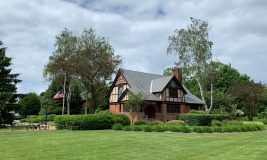
We’re Back in Our Beautiful Building –
Emma Clark Library’s Phased Re-Opening Plan Has Begun!
Stage 1
Library employees have already returned to work in a reduced capacity to prepare the building for safety and social distancing measures. Staff only are permitted in the building.
Patrons may now begin returning items in the Book Drop. Please do not rush to drop off materials. We have permanently eliminated overdue fines going forward! (with some exceptions)
Stage 2 – June 15 –
Contactless “Front Door” Pick-Up
After patrons receive notification from the Library that their items are ready, they must visit our website (emmaclark.org) or call the Library (631-941-4080) to reserve a pick-up timeslot. Your items will be discretely wrapped. Simply pickup the package with your name on it at our front door.
How long until my items are ready for pickup? This depends on whether or not your items are available. If the items are available on our shelves, they will generally be ready within a day. If an item has been recently returned, it’s quarantined first for 72 hours. If someone else has the item out, then it will be available after it is returned and the item has been quarantined.
Staff only in the building during this time.
Instructions for How to Schedule Your Pick-Up Date and Time Here
Stage 3 – July 8 –
“Browsing & Borrowing” – Modified Opening of the Building for Public Use
The building will be open to the public with social distancing in place. There will be some modification of facilities and no public events or gatherings.
Each of these phases is subject to change and will depend on the status of the area metrics and guidelines from the CDC, Suffolk County, and New York State. All materials will be quarantined for 72 hours before being checked-in and re-shelved (they may not come off your record immediately, but do not worry – there are no overdue fines!).
This is new for everyone, and we will be navigating it together. We know we can count on your patience and support.
We look forward to welcoming our community into the building soon!
More information on our phased re-opening plan to come. Please continue to monitor this page and check our social media pages (Facebook, Twitter, and Instagram) for updates.
Library Buddies (3 years old – 2nd grade)
We all miss the Library, but that doesn’t mean we can’t still have fun together. We’ll now bring the Children’s Librarians into your home…virtually, of course! Through the “Library Buddies” program, kids can have one-on-one time with their favorite librarian. We’ll read stories to your kids and chat with them. Kids can show us their favorite toys, stuffed animals, knick knacks, pets, songs, what they’ve read at home…or they can even read to us! Whatever makes your child feel comfortable.
This program is for kids ages 3 years old – 2nd grade. It’s similar to a Show-and-Tell session, but it takes place on the Zoom platform. Request to speak virtually with one of the Librarians in the Children’s Department by emailing kids@emmaclark.org. In the email, please include:
– First name and age of your child.
– Library barcode number (either child or parent).
– Librarian you would like to “hang out” with.
– Preferred day and time to meet virtually.
Our Librarians will get back to you to confirm, as well as include instructions on how to join via Zoom.
The Heart of the Three Village Community